

San Diego Computer Consulting offers four options for remote computing. These options depend on what is best for the client and what they are trying to achieve.
Option 1: Microsoft SharePoint Cloud File Server
SharePoint keeps your content at the center of teamwork. SharePoint connects your business to the information, data, and apps that your business relies on every day. Use SharePoint to store and collaborate files or to create and manage lists of information. All staff can access your site from the SharePoint Home Page or the “Files” section of your Office 365 group. All members can also access their files with the SharePoint Mobile Apps or SharePoint files in Microsoft OneDrive.
Cloud File Server
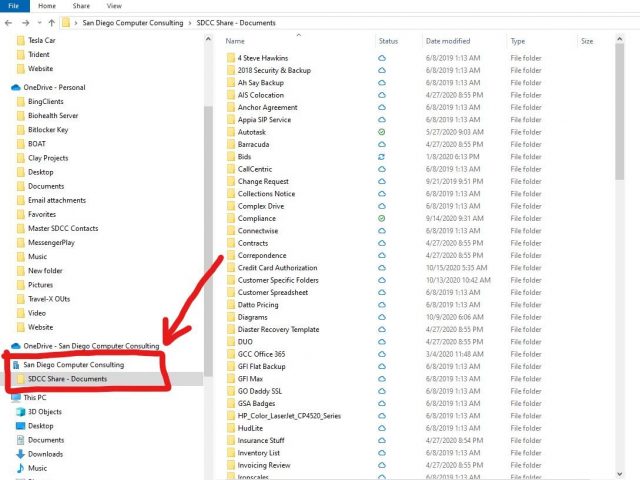
You can use SharePoint as a cloud file server. It will show up on Windows Explorer similar to what is shown in the picture on the right. You can also use SharePoint to see the same files on your phone or tablet. SharePoint is very powerful because it allows you to have access to your office files from anywhere on any device. The files can be cloud-connected, or can be downloaded on your device so that they can be worked on without being connected to the internet. Rights to files and folders can be assigned just like a file server. You can maintain your same user rights and access as you have on a file server.
Phone and Tablet Connected
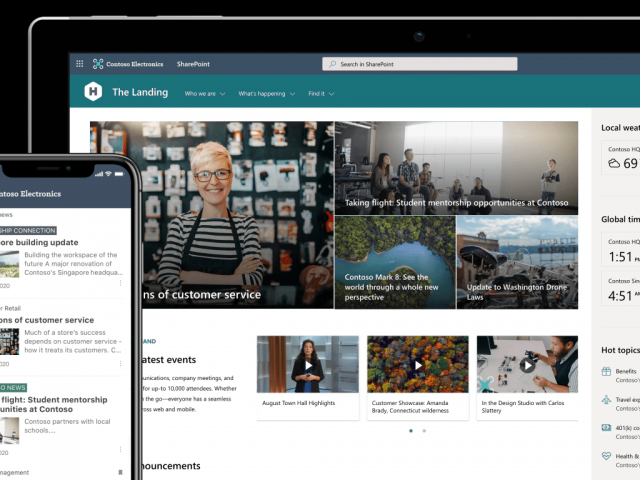
SharePoint provides you the same access that you have on your computer with access to your company’s files via your phone or tablet. The service is seamless and gives you the ultimate connectivity to your data files. SharePoint is similar to Dropbox, but comes with many added options including a useful and intuitive Intra-net webpage for everyone in your company.
Intra-web Interface
SharePoint is very powerful because of the many file access options that it has. SharePoint also has an excellent web interface. On that interface, you can have intra-web notifications and quick access to company files. SharePoint has improved considerably over the years. We implement SharePoint more often to clients as it is one of the most simple cloud-connected services

Virtual Cloud Server in Azure
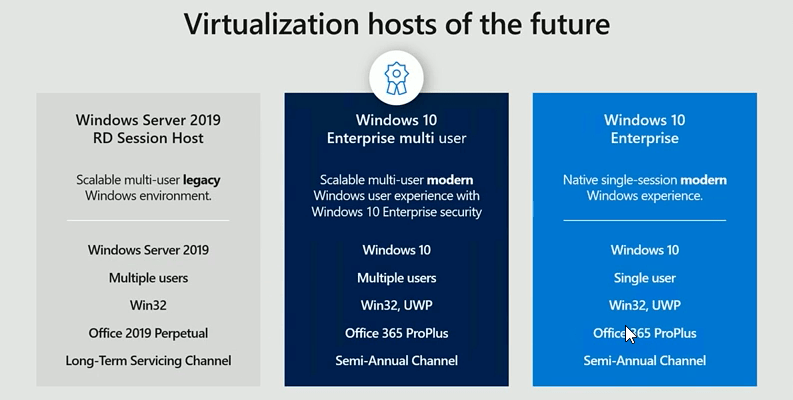
Microsoft Azure offers Virtual Cloud Servers as an option for removing physical server hardware from your office. The virtual cloud servers are dedicated to your company and are your actual server, but hosted in the Microsoft cloud infrastructure. The server can be VPN connected and part of your network. The server can be used as an application server, database server, mail server, remote desktop server, or backup server. The Azure virtual cloud services allow you to maintain your file server as a dedicated files server to your company. This is a useful option because you no longer need to keep a file server on-premise.
This solution is often used as an application/database, remote desktop, or backup server. When using as an application/database server, your server is always online and accessible. This is a powerful option because you no longer need to maintain the hardware and your server is always online as it is a commodity server service provided by Microsoft Azure. Instead of your server being hosted on one hardware box in a data center, your server is now on a cluster of hardware boxes hosted at a Microsoft data center.
Option 2: Azure File Synch or Virtual Server in the Cloud
Microsoft Azure is an ever-expanding set of cloud services to help build your business. Microsoft’s massive global network of data centers provides the foundation for rock-solid and reliable infrastructure. Trusted by over 95% of Fortune 500 companies, Azure is a reliable partner for the cloud-connected business.
San Diego Computer Consulting can show you where the reach and reliability of Azure can benefit your business. Here are just a few of the services that Azure can provide:
- Cloud Servers – Many companies have eliminated the need for onsite servers and data centers by moving to the Azure cloud.
- Azure Active Directory – Synchronize your local user directories to the cloud allowing single sign-on to cloud-connected services.
- Azure File Synchronization – Keep your files in synchronization on your individual file servers throughout different locations.
Azure Windows 10 Enterprise Multi-User
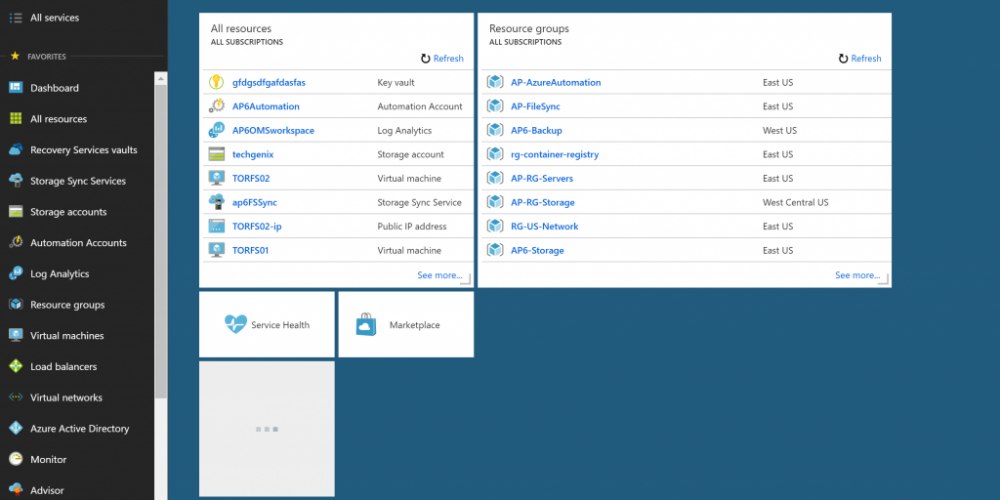
AS a new service from Azure, Windows 10 Enterprise Multi-User is the new replacement for Windows Remote Desktop without a Terminal Server. This solution is a multi-user virtual Windows 10 solution that works well for basic remote access for all users. We typically suggest this solution for companies that do not have a need for a lot of access rights and security on files. This is a great solution for a small multi-user application server, such as QuickBooks. With this service, you can have multiple users log in to the same Windows 10 virtual machine and for simultaneous use. Each user will get their own profile and have their own files and folders separated from the other users.
This remote access solution is sold with Office 365 Enterprise (Pro Plus) which is a special edition of Office 365 that can only work in a multi-user, single machine/server environment. This version of Office 365 is a little more costly per month, but still allows you to download and install up to 5 devices including the new Windows 10 enterprise server service.
The big benefit of this solution is that it is less expensive than Windows Terminal Server on the Azure solution. Keep in mind, however, that with Azure, you are still paying for CPU, Disk, and Bandwidth cycles. Often, to keep those costs down, the machines are set to turn off in the middle of the night for a period of time. The other large benefit is high availability. By having the virtual machine on the Microsoft backbone, you get a high availability service agreement.
Option 3: Terminal Server via Nfinit
Traditional Cloud Computing with Remote Application – Locally Hosted by Nfinit Community Cloud
Cloud computing today is very easy and simple with Microsoft’s Terminal Server technology. With Microsoft Terminal Server, a computer can connect from anywhere on the Internet and unite directly to the office server. Once connected, you can run any software that resides on the office server. We typically offer this option to most of our customers that need remote access to their server. With this traditional system, we often arrange two servers that are in the same remote desktop environment. The first server is the domain controller/file server. The second server is the remote access server. We set this configuration because it emulates a traditional office Windows network where the users, data, and group policies are all managed and secured on a back-end domain controller server. We then use the front end, Terminal Server for the users to log into.
Advantages of Nfinit Community Cloud
The advantage of this solution is that there is NO Charge for the amount of CPU, Diskspace, Bandwidth, or other cycles on this remote access solution. Unlike Azure, which charges you for usage, this is a flat rate server service. The pricing for this remote access service is set by San Diego Computer Consulting. This is an advantageous option because you don’t have to worry about computer cycle usage.
Option 4: Terminal Server Dedicated Server in SDCC's Data Rack @ Nfinit
Traditional Cloud Computing with Hosted Servers by San Diego Computer Consulting
We still support hosted physical and virtual servers for many of our clients. There are a variety of reasons why we host servers in our data rack at Nfinit. Those reasons vary from special privacy, to management, and to required peripheral hardware. There are large economies of scale when you host a server with us directly. SDCC is very flexible and can host your server with any special requirement and keep the costs down because the server is in a competitively priced and controlled environment.
Advantages of a Dedicated Server
Having a dedicated server (virtual or physical) in our data center allows you to carefully migrate to the cloud without increasing your costs too much. We are able to take any physical server, image it, and put an exact replica of that server in our data center. We then are able to VPN your server directly back to your network. This allows for a complete and easy transition to the cloud. Once the server is at our data center, your options are much easier as you transition to the cloud.
There is NO Charge for the amount of CPU, Diskspace, Bandwidth, or other cycles on this remote access solution.
The servers belong to you! You may upgrade, expand, power, and add memory at will. There are no additional monthly service costs for additional options. This is advantageous because the server is your property and you can upgrade and change it without additional monthly fees.
The team at San Diego Computer Consulting always works carefully with our customers to select the best cloud system. There are many cloud solutions. Making sure the RIGHT solution is used is key. Let us help you!
