
RDP

Secure Remote Access Solutions

Remote Access That’s Secure, Flexible, and Built for Today’s Workforce

Empowering businesses with safe, seamless connectivity.

In today’s environment, reliable remote access is essential. At San Diego Computer Consulting, we take pride in helping our clients and colleagues stay connected to their office systems from anywhere. Our entire team works remotely, benefiting from a flexible workday and dependable tools that support diverse workflows.

Because every business has unique software requirements, we employ a variety of remote access solutions tailored to different platforms and environments. These range from VPN connections to Remote Desktop configurations—each with its own method of accessing data and tools securely.

Above all, security is non-negotiable.

To defend against cyber threats—including ransomware attacks and data breaches—we implement protective measures such as VPNs and two-factor authentication. Hackers are growing more sophisticated in their efforts to infiltrate networks and encrypt data, often with the goal of financial extortion. That’s why we stay ahead with secure remote solutions that shield your systems from malicious intrusion.

San Diego Computer Consulting ensures your files, applications, and sensitive information remain protected—so your team can focus on what matters most.

Remote Work Solutions In Action!

Affordable Remote Access Solutions for Today’s Workplace

Empowering flexible work with secure, cost-effective technology.

At San Diego Computer Consulting (SDCC), we understand how crucial remote access has become in today’s business environment. That’s why we offer a range of economical solutions—including Windows Remote Desktop, SharePoint, Azure Remote Access Server, and more—all designed to keep teams connected and productive from anywhere.

We proudly support a flexible work culture, allowing our entire staff to operate remotely while maintaining full access to the tools they need. Because every workplace has unique software requirements, SDCC uses a variety of remote access technologies tailored to your specific setup. From accessing files securely to running critical applications offsite, we match solutions to your business goals.

Whether you’re a small team or a growing enterprise, we’ll help you build secure, reliable remote access with the flexibility and scalability your workforce deserves

Microsoft Office 365/One Drive for Personal & SharePoint for Business

Office 365 Email Solutions – Reliable, Accessible, and Synced Across Every Device

Streamlining communication with enterprise-grade tools.

At San Diego Computer Consulting, we rely on Office 365 as the backbone of our business email system. With Outlook serving as our intuitive front-end interface, Office 365 provides a secure, cloud-based platform to manage our corporate email infrastructure efficiently.

One of the key advantages of Office 365 is its seamless accessibility—it empowers our team to access email, contacts, calendars, and tasks from virtually any device, at any time. Whether on a desktop, mobile phone, or via the web, changes made on one device are instantly synced across all others, ensuring continuity and consistency.

This synchronized environment enhances productivity, supports mobile workflows, and helps our team stay organized and connected—no matter where they’re working.

One Drive

Microsoft Office 365/SharePoint Cloud File Access

SharePoint – Secure, Cloud-Based File Access Across All Devices

Simplifying collaboration without the need for a traditional file server.

At San Diego Computer Consulting, we leverage SharePoint as our primary file-sharing platform—providing seamless access to shared documents across all devices. Comparable to Dropbox in function, SharePoint delivers much more in terms of enterprise-level control and integration.

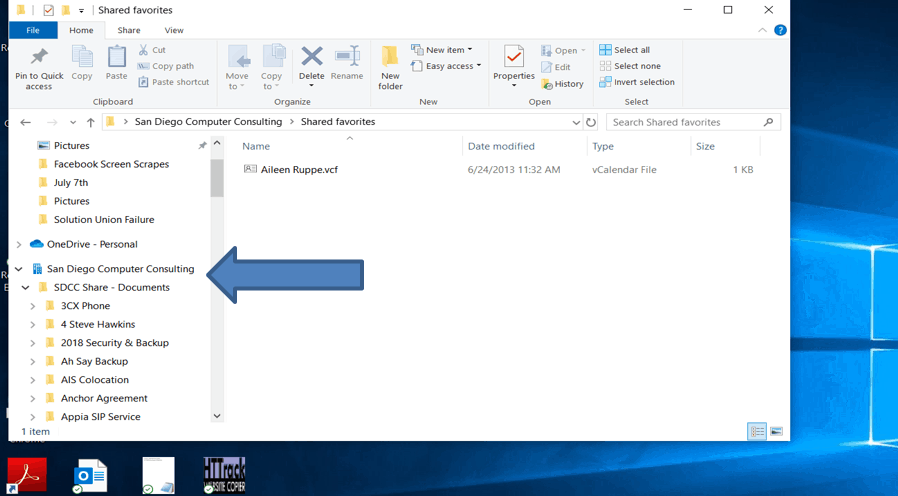
Within SharePoint, files are organized into distinct libraries—each functioning like a mapped drive. Permissions are assigned per library, allowing us to control who has access to what, ensuring both privacy and collaboration across teams.

By syncing files between the cloud and user devices, our staff can work online or offline with confidence. This eliminates the need for a bulky file server, while still offering fast, reliable access to documents via Office 365’s secure environment.

It’s a flexible, secure system that scales perfectly with our workflow—whether we’re at the office, on the go, or working from home

One Drive For Personal & SharePoint for Business.

Office 365 – Empowering Remote Work with OneDrive and SharePoint

Secure, seamless access to personal and shared files anytime, anywhere.

At San Diego Computer Consulting, we take full advantage of the powerful tools included in Office 365 Business Premium—especially OneDrive and SharePoint, which make remote access easy and effective.

OneDrive (Personal Use):
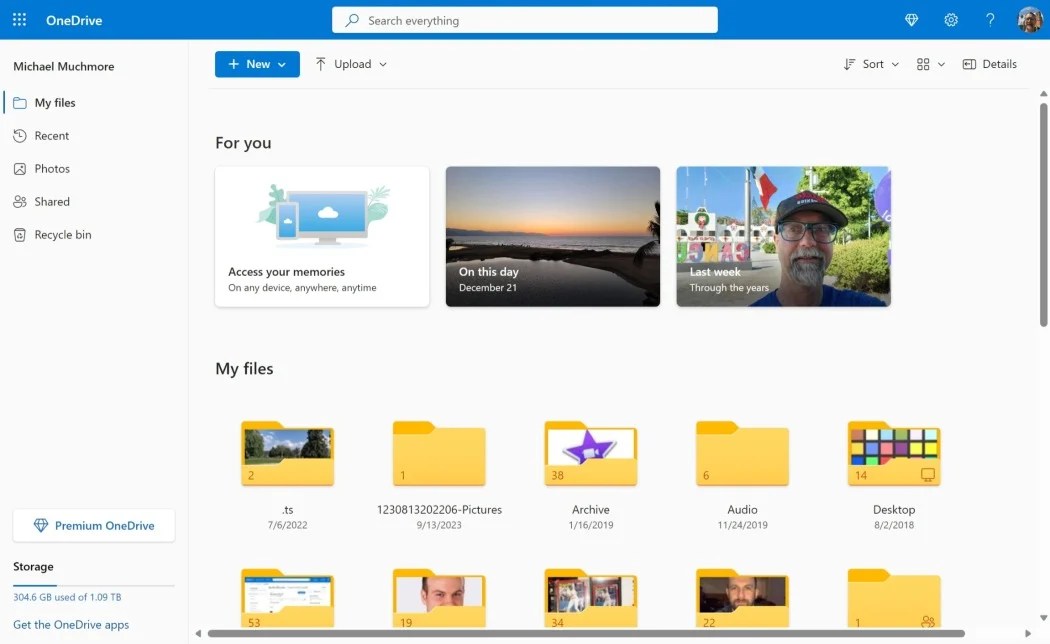
OneDrive lets users back up, store, and access personal data from any device. Moving files to OneDrive provides secure cloud-based backup and ensures availability whether you’re working from home, on the go, or at the office.

SharePoint (Business Use):
Often referred to as “OneDrive for Business,” SharePoint offers a separate platform for shared company files. We organize our data into libraries—each functioning as a master share, similar to a mapped network drive. Permissions are carefully configured so users can access only what they need, ensuring secure collaboration within the team.

Together, OneDrive and SharePoint eliminate the need for large file servers and streamline remote file access. With data stored securely in the cloud and synced across devices, Office 365 creates a modern, flexible workspace tailored to your business needs.

SharePoint
SharePoint

SharePoint – A file server in the cloud provided by Microsoft Azure Cloud Services

SharePoint – Enterprise File Services Powered by Microsoft Cloud

Secure, scalable, and accessible from anywhere.

SharePoint is a powerful cloud-based file service included with the Microsoft 365 Business Premium plan, which also provides business-class email and access to Microsoft Office applications.

Delivered through Microsoft Azure, SharePoint enables teams to access office files seamlessly from desktops, laptops, smartphones, and tablets. Its cloud architecture eliminates the need for a traditional file server—while keeping data available, flexible, and synced across devices.

Security is a cornerstone of our SharePoint implementations. San Diego Computer Consulting requires Microsoft’s two-factor authentication for all SharePoint access. Even if login credentials are compromised, unauthorized users can’t access data without second-layer approval via a user’s smartphone.

Each library within SharePoint functions like a mapped drive and is configured with specific user permissions. Administrators can control file access rights and instantly revoke them if necessary—automatically removing data from user devices to maintain security.

To ensure reliability and protection, SDCC backs up all SharePoint environments using enterprise-grade solutions from SolarWinds, Inc. We believe cloud services should never rely on a single safeguard, and our backup strategy reflects that commitment.

Our goal is simple: deliver high-availability, tightly secured SharePoint deployments that empower flexible remote work and dependable data access

Windows Remote Desktop Server-(Terminal Server) For Up To 20 Users

Windows Remote Desktop – Full Access to Your Office from Anywhere

A built-in, feature-rich solution for secure and flexible remote work.

At San Diego Computer Consulting, we rely on Windows Remote Desktop to provide seamless access to our office machines from anywhere. Included with every copy of Windows Professional, this powerful tool allows users to connect directly to their workstations with ease and speed.

Once secured with two-factor authentication, Remote Desktop offers a safe, encrypted connection—ensuring your data and systems remain protected.

Remote Desktop gives users full functionality of their office computers, including:

  • Cutting and pasting files
  • Mapping network drives
  • Sharing printers and scanners
  • Accessing all connected monitors

One standout feature is multi-monitor support: if you have multiple monitors at the office and at home, you can mirror your full setup remotely. This drastically improves workflow and productivity for professionals who rely on screen real estate.

With no additional cost and enterprise-grade capability, Windows Remote Desktop remains a cornerstone of secure, efficient remote operations

quickassist

Terminal Server (Remote Desktop Server)-Up To 20 Users Per Server.

SharePoint – Secure, Scalable Cloud File Services Powered by Microsoft Azure

Efficient access, powerful control, and enterprise-grade protection.

San Diego Computer Consulting proudly utilizes SharePoint—a robust cloud-based file service included with the Microsoft 365 Business Premium plan. This comprehensive solution also provides business-class email and the full suite of Microsoft Office applications, streamlining workplace productivity.

SharePoint, powered by Microsoft Azure, allows users to access office files seamlessly from workstations, laptops, tablets, and smartphones. By replacing the need for a traditional file server, it enables fast, flexible access to company data across devices.

Security is paramount. All SharePoint environments we deploy are protected by Microsoft two-factor authentication. Even if login credentials are compromised, unauthorized access is blocked until approved via the user’s smartphone. We carefully manage file permissions, ensuring data access is controlled—and automatically revoked when necessary.

To safeguard against data loss, SDCC implements Office 365 backup solutions powered by SolarWinds, Inc. We believe redundancy is critical in any cloud strategy and ensure that SharePoint environments are not only secure but also reliably backed up.

Our team is committed to delivering high-availability SharePoint installations that empower remote work, enhance security, and offer confidence that your information is safe—wherever your business takes you.

Want Your Employees To Have Secure Remote Access?

San Diego Computer IT Experts have the solutions for your business. Contact us by clicking the button.